For bands
One subscription. Everyone you play with.
Only the person whose library it is pays for anything — $7 a month, however many people you add, and however many bands you run out of it.
Only Owners pay
The subscription belongs to the library, not to the people. Everyone you add uses Chordisplay free, on their own device, with their own account, and never enters a card.
A five-piece band is one subscription. So is a twelve-piece. You're paying because the library is yours — not because there are other people in the band.
More than one band, one library
Categories hold your charts. You invent the names — Covers, Lazer Mice, Funerals — and a chart can sit in as many of them as you like, so the standards that both bands play don't need writing out twice.
People are added to a setlist, so each band opens the sets you've put them on and nothing else. The Tuesday covers band never sees the orchestra's setlists. A side project doesn't need a second library; it needs a category.
Every setlist anyone has put you on shows up in one list alongside your own, with whose it is on each row. Play in three bands and you still sign in once.
How it's organised
You own a library — your charts and your setlists. Nobody else has standing access to it, and nothing you add makes it more visible.
What you hand out is a setlist. Add the bass player to Friday's set and Friday's set is what they get: its songs, in order, with whatever's been marked up on them. Not the other four hundred charts, and not the other band's Saturday.
That's the part worth reading twice, because the intuitive version is the other one. Access is per setlist. A library is never shared.
The three roles
| Role | Read the set | Change the set | Create setlists | Edit charts | Give access |
|---|---|---|---|---|---|
| OwnerPaid | ✓ | ✓ | ✓ | ✓ | ✓ |
| EditorFree | ✓ | ✓ | — | — | — |
| ViewerFree | ✓ | — | — | — | — |
"Change the set" means adding, removing and reordering songs, and setting a song's tempo or arrangement for that gig. Editors can do all of it. What they can't do is rename or delete the setlist itself, or touch a chart in your library.
A role is a relationship to one setlist, not a rank someone holds. The same person can own their library, be an Editor on your Friday gig, and be a Viewer on somebody else's Sunday.
What an Editor can add songs from
Someone adding a song has to be able to search for one, so you decide what they're searching. It's a setting on the setlist, with three options:
- Nothing — the default. They reorder and mark up what's already there, and the only charts they can see are that set's songs.
- One category — they can search and add from that category. Nothing outside it exists to them.
- The whole library— for the band you'd have handed everything to anyway.
The middle one is the interesting one. It's how a single library serves two bands without either seeing the other's material.
Groups
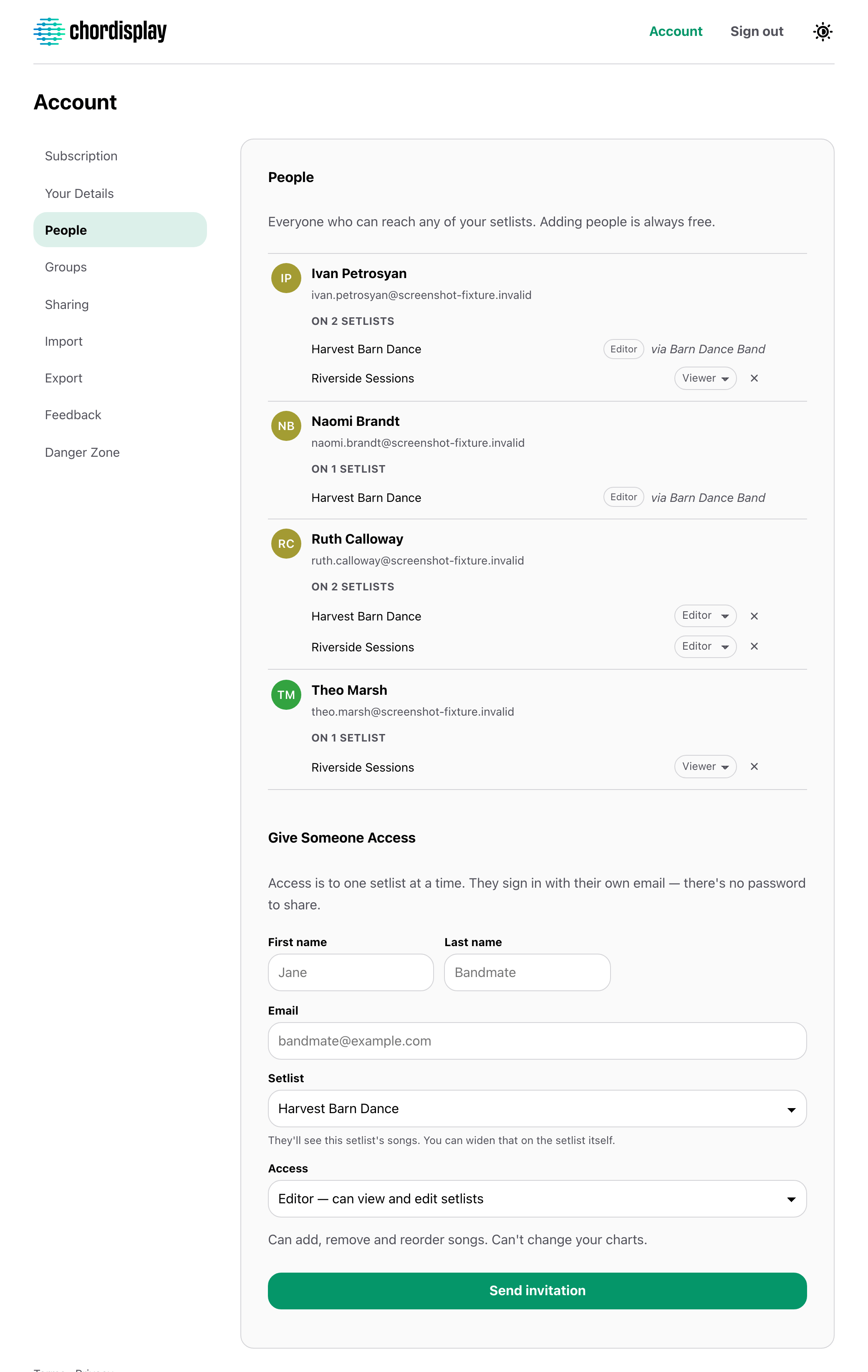
A band is the same five people every week, so name them once. A group puts all of them on a setlist in one go, and remembers the role and the search limit you'd otherwise set forty times over.
Membership stays live: add someone to the group and they get every setlist it's on, past and future. Every group screen says how many setlists it currently grants, because that's the number worth knowing before you add anyone.
When a band has two Owners
Common, and worth being plain about: two Owners means two separate libraries, each its own. Both of you build your own setlists and give your own access. Neither can edit the other's charts, and the two never merge or sync.
Only one Owner owns any given setlist, and it draws from their library. The other joins it as an Editor like anybody else — their own library is untouched and invisible there.
You'd each have your own subscription, because you each own a library.
Sending charts to another Owner
Offer them one chart, a whole category in one go, or your entire library. They have to accept it, and what lands is their own copy.
From that moment the two are independent: your edits don't reach them, theirs don't reach you. Offering the same chart again updates the copy your earlier share created — that's how you push a correction across — and it can never overwrite a chart they wrote themselves.
It's a copy rather than a sync on purpose. Two bandleaders each keep the version they actually play.
Adding someone
Their name, their email, the setlist, and Editor or Viewer. They sign in with a link — no password to set up, and nothing for you to reset later.
Changing your mind takes effect on their next tap rather than their next sign-in, which matters on the day somebody leaves the band.
Add the band. You're the only one who pays.
$7 a month for your library, and everyone you add is free.